Every new campaign used to start with the same question: where are the logo files, and which blue is the right blue?
At three creators, the answer lives in someone's head. At twenty, it lives in a shared drive nobody trusts, a chat thread from March and the memory of whoever did the last launch. Every lead page, QR code and monthly report turns into a small design project, and small design projects are where launch dates slip.
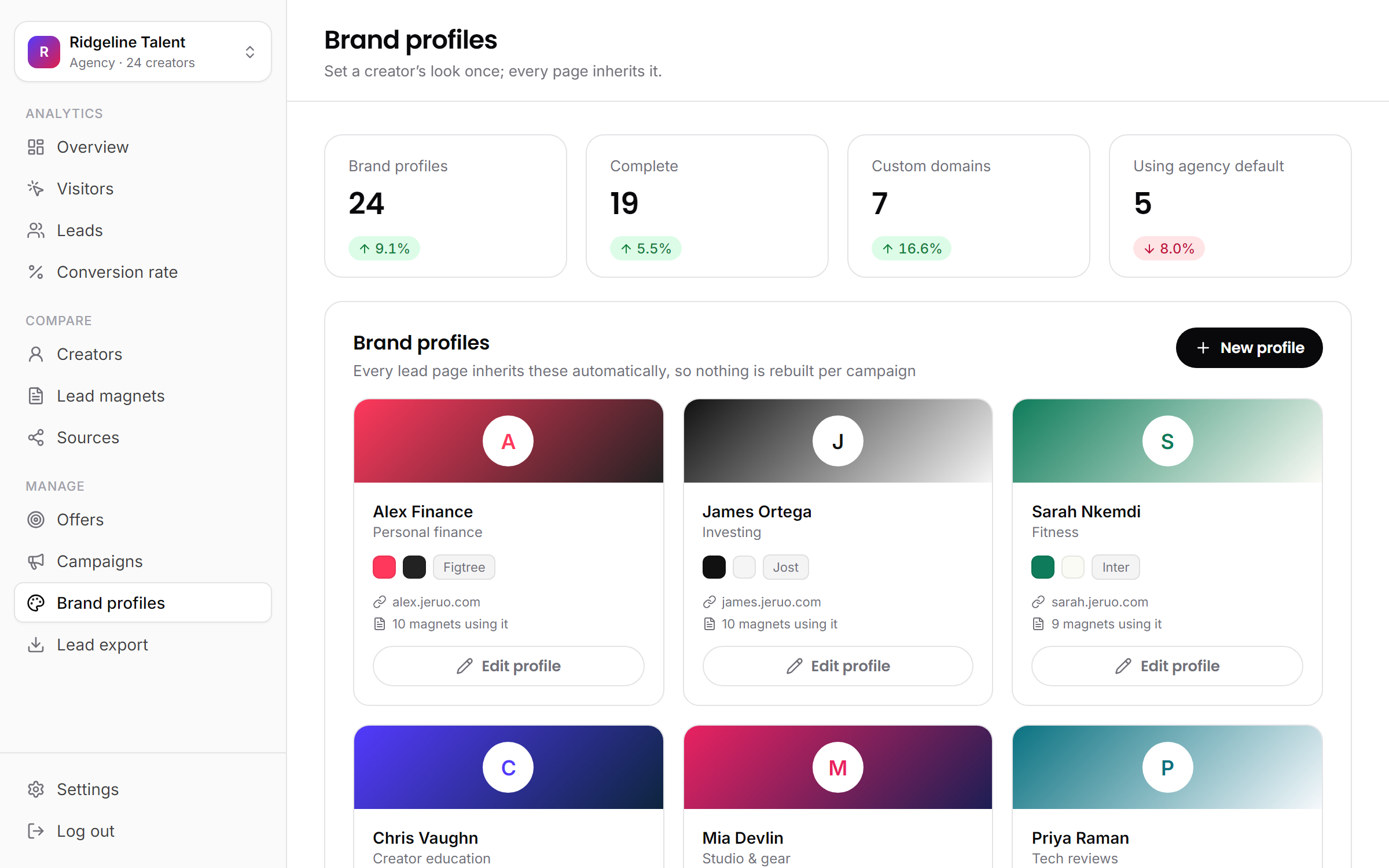
A brand profile fixes this by moving those decisions out of people's heads and into one record per creator. This article covers what goes in one, how to set it up, what it feeds, how to keep it current and what happens when a creator leaves the roster.
The cost of rebuilding a creator every time
None of this work is hard. It is repetitive, and it multiplies. Every asset needs the right logo file, the hex code for the brand color, the font, the privacy policy link, and a round trip with the creator to confirm it looks like them. Nobody budgets for that, so it shows up as delays.
The second cost is drift. Three people build three pages for the same creator and produce three slightly different blues. A QR code goes out in default black because nobody had the colors on hand. None of it is a disaster on its own. Together, it makes one creator's pages look like they came from three different vendors.
That matters more than it sounds. A viewer arriving from a video expects to land somewhere that looks like the person they were just watching. A page that does not look like the creator asks the visitor to trust a stranger, at the exact moment you are asking for their email address.
A hypothetical month
Say each new page, QR code or report takes 30 minutes of file-hunting, color-matching and checking before the real work starts. Twenty creators with four assets each a month is 80 assets, or 40 hours: a full working week spent rediscovering decisions that were already made.
What a brand profile holds
A brand profile is the short list of decisions that make a page look like one specific creator. It is deliberately small. Anything that changes from campaign to campaign (the offer, the headline, the lead magnet) stays out of it.
| Field | What to collect | Watch for |
|---|---|---|
| Name and page address | The creator's name and a short address, like alex-finance | Treat the address as permanent: changing it later breaks page links already shared |
| Brand color | The exact hex code from their brand kit or channel art | Colors picked by eye from a screenshot drift a shade every time |
| Dark color | A deep shade from the same palette | Plain black, when their palette has its own dark tone |
| Font | The closest match to the type they already use | Choosing a favorite instead of a match |
| Logo or photo | A square logo, or a headshot for face-led channels | A wide wordmark squeezed into a square |
| Privacy policy link | The URL of the creator's own policy | Leaving it for later, when it belongs under every form |
| Custom domain | Optional: an address the creator owns, like go.creator.com | DNS changes depend on the creator's side, so ask early |
The custom domain is the only field that takes real lead time. Without it, pages live on the creator's own jeruo address, which is fine for most launches.
Why set it once
The point of a profile is not the fields. It is that the decisions get made once, with the creator, and signed off. After that, nobody on the team improvises. Three things follow.
Launches get faster. The first step of every asset is already done. A new lead page starts in the creator's look, so the work begins at the offer and the copy rather than at the color picker.
Quality gets consistent. The floor rises for everyone. A new hire's first page for a creator looks the same as one built by the person who has managed that creator for two years, because both started from the same record.
Approvals get shorter. The creator approved their look once. Every review after that is about the offer and the placement, not the shade of green.
In jeruo, brand profiles are listed as creator brand presets on the pricing page and come with the Studio plan and up.
Setting one up
A profile takes a few minutes per creator, and most of that is finding the files. The setup itself:
- Add the creator. Give them a name and a page address. An address like
alex-financegives you pages at/p/alex-finance, served asalex-finance.jeruo.com. - Pick the two colors. Paste the brand color and the dark color as hex codes rather than choosing by eye.
- Choose the font. Pick the closest match to what the creator already uses on their channel art or website.
- Upload the logo or photo. Square works best. For creators whose face is the brand, a headshot usually reads better than a logo.
- Add the privacy policy link, and the creator's own domain if they have one.
The faster habit is to do the gathering during onboarding. Add four lines to your creator intake form: logo files, hex codes, font name and privacy policy URL. Then the profile takes five minutes on day one instead of a week of follow-up messages.
Before anything goes live, show the creator one finished page built from the profile. That single sign-off covers every page that follows.
What inherits it
Once the profile exists, nothing is rebuilt per campaign. Three things draw from it.
- Lead pages. Every page for that creator comes out in their colors, font and logo, with their privacy policy linked under the form. The page itself stays simple: name, email and a consent checkbox, nothing more.
- QR codes. Branded codes in the creator's colors, as PNG or SVG, for video overlays, print and merch. Placement matters more than color, and QR codes in video covers where they work.
- Client reports. The monthly report goes out in the creator's brand, so it reads as theirs rather than as an export from your tools. Client reporting that stops churn covers what belongs in it.
This is where the time comes back. Launching the same lead magnet format across five creators becomes five pages that each look native to their creator, not five design tickets. The team's hours move from production to the parts that change results: the offer, the placement and the call to action.
Keeping it current
Creators rebrand. New channel art arrives, a color shifts, a logo gets simplified. With a profile, the update happens in one place: edit it and every live lead page for that creator follows, and next month's report uses the new look.
Two things do not update themselves, and both are worth knowing before the rebrand.
QR codes already downloaded. A PNG or SVG is a file, and its colors are baked in. Codes already sitting in published videos keep working, since they point to the same link, so there is no reason to re-edit old content. Download fresh files for new placements.
The page address. Do not fold a new address into a rebrand. Page links already shared will break, even though tracked links keep working. If the creator's name changes, decide deliberately whether the old address stays.
A light routine helps: once a quarter, open each profile next to the creator's current channel and check that they still match. With 20 creators, that is an afternoon.
When a creator leaves
Rosters change, and the exit should be as orderly as the launch. In jeruo, you archive the creator. Their leads stay with the agency, archived creators keep their data, and you can restore one if the creator comes back. Archiving also opens up their slot on your plan for the next signing.
The brand profile is different. The colors, font and logo were always the creator's identity, not the agency's, so the profile can go with them. Handing it over cleanly costs nothing and leaves the relationship in a better place than a scramble for files.
Two practical notes. Archiving retires the creator's pages, so time it with the handover rather than doing it the day the contract ends. And settle who keeps what (the list, the assets, the pages) in the contract at signing, when everyone is still on good terms.
The short version
- Every page, QR code and report should start from one approved record of the creator's look, not a search through old files.
- Collect logo, colors, font and privacy link at onboarding, and the profile takes minutes.
- Update the profile once and live pages follow. Downloaded QR codes keep working; re-download them for new placements.
- When a creator leaves, archive them: the leads stay with you, and their look goes with them.